
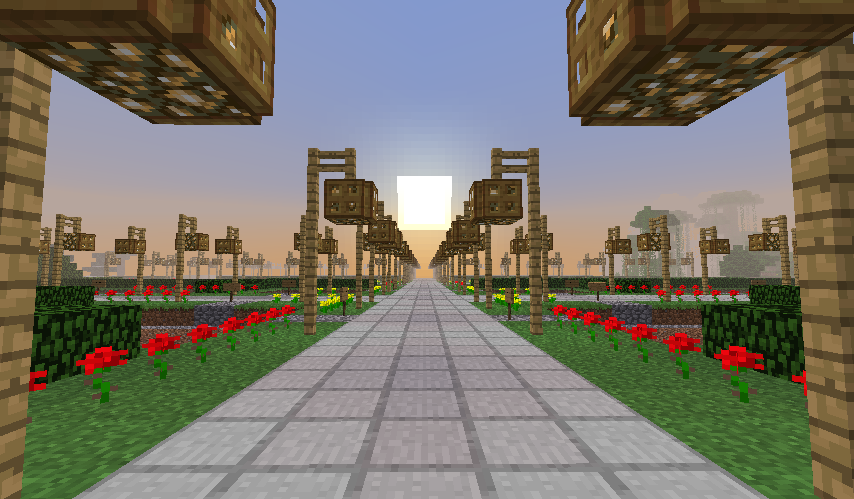
TotalFreedom is a free-form, sandbox Minecraft server where every player can use creative-mode features and commands. Upon joining the server, new players are immediately given "total freedom" to do whatever they want—whether it be to build using WorldEdit commands, PvP/melee using Essentials, or even just for the same of goofing around. TotalFreedom provides a no-frills, do-what-you-want experience for those who would prefer to 'think outside of the box,' if you will.
That being said, "total freedom" does not, by any means, translate to "total anarchy." If you attempt to grief or otherwise disrupt players on the server, sactions to include temporary banning are in play. All players are equal with the same "operator" privileges, however regular players can be accorded admin status by positively contributing to the server. Positive contributions include producing fantastic builds that get saved for use in our sandbox "flat" world, assisting the server admins in dealing with griefers, and/or cleaning up their messes (e.g. spawn destruction), assisting new players, keeping the server free of lag, and so on and so forth.
The list of server admins are posted on this webpage and may be viewed by anyone. The IP address of the server is play.tfreedom.org, however you may also use tfreedom.org (an SRV record). The server's features are fully upgraded to the Minecraft server version 26.1.2. In addition, players may join the server with any client version of Minecraft from 1.13 up to 26.1.2.
Server Help
Saving and Loading Builds With WorldEdit
Due to the immense and immediate world changing capabilities of the plugins this server runs, and the influence of frequent griefing, the server is frequently reset and restored to a default saved map. Except as arranged with the server owner (markbyron), all builds, experiments, and user inventories are temporary unless you save them using WorldEdit.
To save your builds (i.e. create a WorldEdit schematic), first use the //wand tool to select the bounds of your build (i.e. the opposite corners of your build, see the WorldEdit Quickstart Guide for help.) Then, type //copy to place your build on the clipboard, and type //schem save nameofbuild to save your build (replacing nameofbuild with a unique name of your own).
To load a schematic back into the world, do //schem load nameofbuild, and then //paste.
WorldEdit Cautions
When using the WorldEdit plugin, avoid selecting a radius greater than 50 or an area greater than 25,000 blocks. Selecting overly large numbers will typically lag and crash the server (which of course is a violation of the rules above). If you make a World Edit that accidentally causes destruction to the spawn or other player builds, you should immediately say //undo. While accidents can happen, be responsible, and if you're just learning WorldEdit, test the commands in remote part of the map far away from any other builds.
Getting OP'd
When you join the server, in order to use the full set of commands you must be "opped". Simply request an admin give you OP permissions. Without OPs, you are default to creative mode and may obtain any inventory item.
Vanilla Server
If the CraftBukkit (the software this server runs on) is unavailable due to a recent Minecraft software change, we will be forced to use the standard Minecraft server software. As the standard server software is extremely limited, we can only give ops to existing admins and other players will be given creative mode by default.
A limited set of commands work with the Vanilla server, for more information see Vanilla Server Commands.
Flatlands
This server features an additional flat-land building world which is very useful for building intricate creations. You can access this world by typing /flatlands, and you can get back to the main world by typing /flatlands again.
Nether and "The End"
You can use standard portals to access the Nether but the End world has been temporarily disabled due to crash exploitation
Gamemodes
You are free to either use creative or survival mode on the server. For creative, type /creative. For survival, type /survival.
Other Plugins
As Minecraft is continually updated, there is no guarantee that the mods and plugins will continue to function or that the developers will fix them when Minecraft is updated. We will do our best to update or replace mods and plugins as needed. If you have suggestions, please send a message to MarkByron.
If you create mods yourself or know of other mods that you'd like to see here, let MarkByron know!
Exclusive Commands!
This server runs a unique set of plugins, some of which were modified and created specifically for this server. Because of this, we have a few commands avaliable you wont see anywhere else:
- /nicknyan: Use this as a replacement to the /nick command to have a rainbowlicious display name!
- /radar: Prints the people nearby in your current world.
- Various additional admin commands, if you need them, ask a senior admin for help.
You can always type /help <command> to get help for a specific server command.
External Resources
We frequently change and update the plugins that run on this server. You can see what is currently running by typing /plugins. If you are not familiar with the operation of a plugin, you are encouraged to look it up on Google and read its documentation in order to fully understand it. Below you will find resources to help you with our core set of plugins.